At Cloud Sultans, our mission is to help small and large businesses to better collaborate and achieve high productivity with their teams by maximizing the power of Google Workspace (formerly GSuite). Part of our strategy at Cloud Sultans to boost team productivity involves leveraging the features of Google Workspace tools, amongst which Google Tasks stands out as a pivotal player.
Google Tasks is a dynamic and integral part of the Google Workspace environment, designed to simplify the task of team management. Its user-friendly interface and simple approach make it an attractive tool for managers and team leaders alike. This article presents an in-depth guide on using Google Tasks for effective team management.
—->>>> Cloudsultans.com we love helping our clients and guide them to success. That’s one of the reason, we ask you please to share this post in social media to your network. 🙂
1. Crafting a New Space for Streamlined Task Management
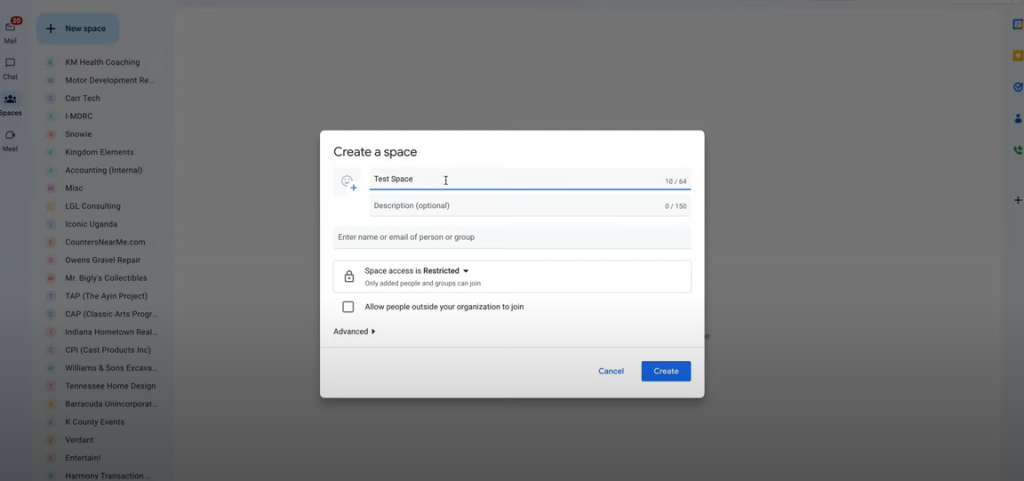
Every efficient task management operation starts with creating a dedicated space. Google Tasks allows you to create a new space where you can perform all your team’s task management activities. As you establish this space, you have the flexibility to add a descriptive title and open it up to collaborators outside your organization. This is a boon when you are working with external clients or independent contractors who don’t have an email under your domain. Once this space is set up, you can add your team members to it, thus kick-starting your task management.
2. Assigning Tasks and Fostering Discussions
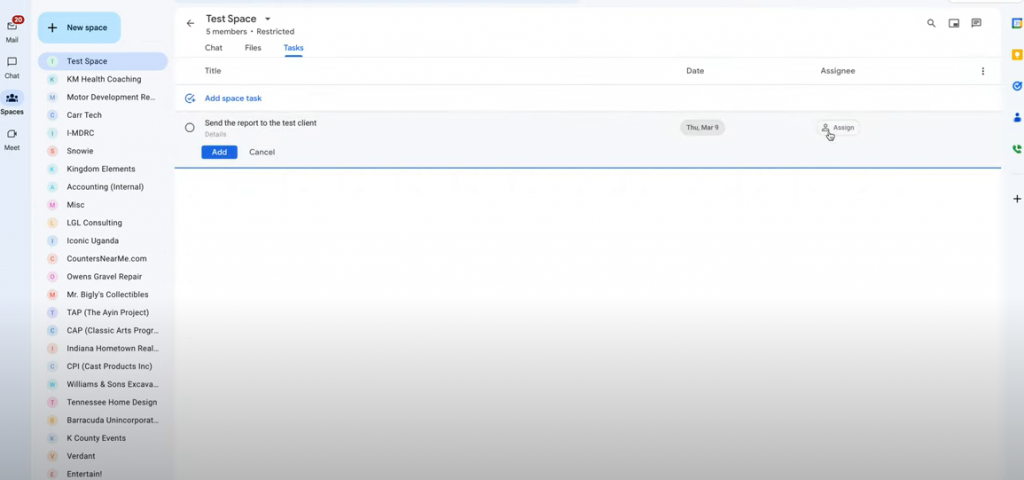
Google Tasks’ intuitive features facilitate the easy assignment of tasks to team members. For instance, if you have a task to send a report to a client, you can assign a due date to it and delegate it to a specific team member. The conversation about this task unfolds conveniently in the chat, making it possible for all team members to discuss it and clarify any doubts. This structured approach to conversation fosters a culture of openness and focused discussions on particular tasks, enhancing the team’s overall productivity.
3. Keeping Tasks and Files Organized
With Google Tasks, you have a well-structured platform to keep all your tasks and related files in one place. You can effortlessly upload essential files like contracts or logo files that pertain to a specific project. This feature ensures all team members in the space can access these files, fostering a sense of inclusivity and collaboration. This streamlined file management system also mitigates the risk of lost files or miscommunication.
4. Facilitating Individual Task Management
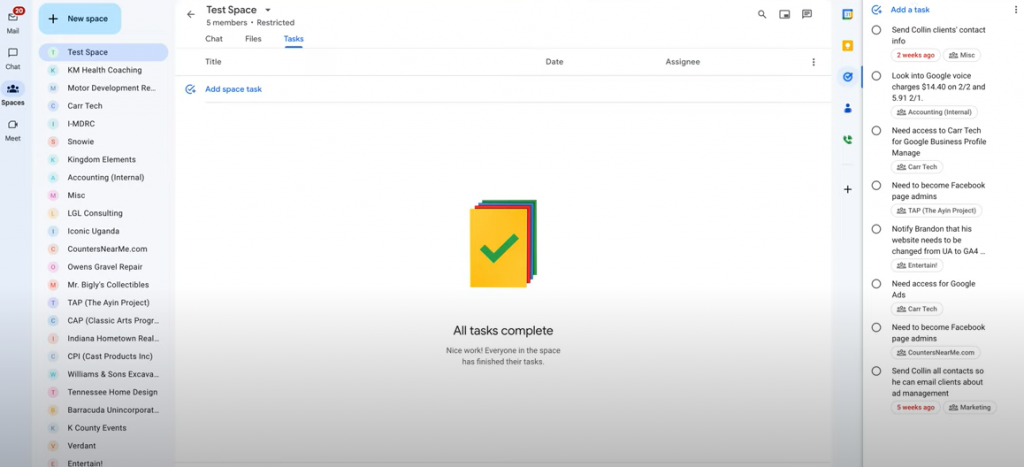
Every individual on your team can view all tasks assigned to them via Google Tasks, providing a personal, comprehensive overview of their responsibilities. While Google Tasks does not allow for task prioritization or organization based on deadlines, it is still a handy tool for keeping a tab on your responsibilities and their completion status. Despite some limitations, it serves as an effective personal task management tool, encouraging individuals to manage their time and tasks efficiently.
5. Integration with Google Calendar for Better Time Management
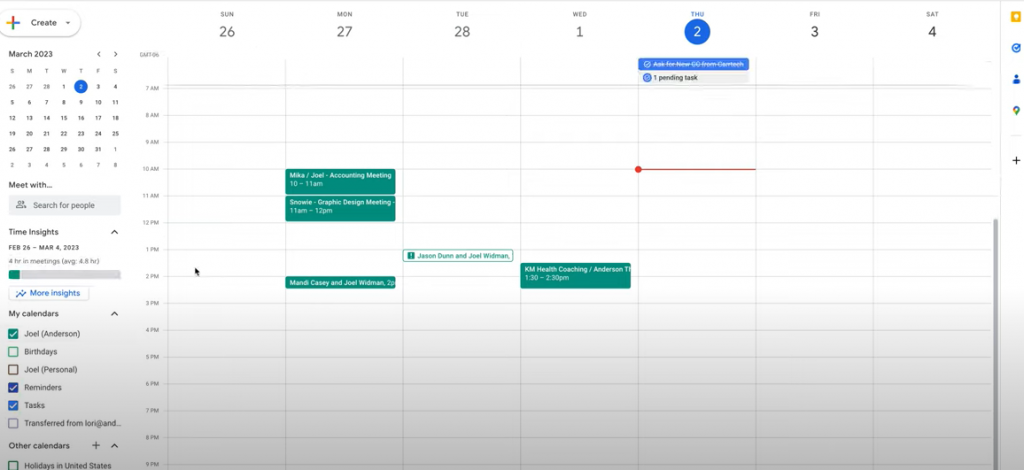
One of the highlights of Google Tasks is its seamless integration with Google Calendar. This integration displays all your tasks for the day or the month directly on your calendar. With this feature, you get a high-level view of your impending tasks, enabling better scheduling and time management. It is an excellent tool for planning ahead and ensuring you meet all your deadlines.
6. Google Tasks: An Evaluation of Its Strengths and Limitabilities
Google Tasks stands out for offering an all-in-one platform for managing emails, chats, spaces, files, and tasks. It consolidates all work-related items in one place, which significantly enhances task management efficiency. Moreover, its inclusion within Google Workspace means you can leverage its benefits without incurring any additional cost.
7. Google Tasks: A Comprehensive Tool Despite Its Limitations
Google Tasks is a straightforward yet effective tool for team management. Its limitations are compensated by its overall functionality, simplicity, and the integration capabilities with other Google services. The application’s intuitive user interface allows team members to communicate effectively and stay on top of their assigned tasks, enhancing productivity and ensuring timely task completion.
Yet, these limitations do not drastically diminish the value of Google Tasks. It provides a one-stop solution for managing tasks, holding discussions, and sharing files, which are the cornerstones of any project management tool. Moreover, its seamless integration with Google Calendar offers a visual representation of tasks, further aiding in efficient time management.
Google Tasks shines in its simplicity. While it may lack some sophisticated features found in premium task management tools, it’s a robust, easy-to-use, and reliable tool that serves the needs of various teams. Its inclusion in Google Workspace, at no additional cost, also adds to its appeal.
Overall, despite some areas for improvement, Google Tasks successfully brings together the essential elements of team management in one place, making it an effective tool for both small and large teams. By leveraging its full potential, teams can create a more streamlined and organized working environment.
8. Optimal Use of Google Tasks: Embracing Customization
One significant advantage of Google Tasks is the ability to personalize it with extensions from the Google Play Store. These add-ons introduce extra functions and automation options, enabling you to tailor the application to your team’s specific needs. This level of customization ensures that, despite some inherent limitations, you can still tweak Google Tasks to function optimally for your team.
9. Google Tasks on the Go: Task Management from Your Mobile
In this age of mobile computing, Google Tasks doesn’t disappoint. With nearly the same capabilities as the desktop version, the Gmail app integrates Google Tasks, providing the convenience of managing your tasks anytime, anywhere. This feature ensures seamless task management, irrespective of your location, making Google Tasks a reliable companion for remote and on-the-go working conditions.
10. Google Tasks: A Cost-Effective Team Management Solution
Despite its limitations, Google Tasks is a valuable asset for any team. Its ability to provide a unified platform for managing tasks, chats, files, and spaces in one place and at no extra cost make it a winning choice for small and medium-sized teams. Even with constraints in organizing and creating sub-tasks, it still offers enough value to be a robust, cost-effective solution for managing your team.
In conclusion, Google Tasks provides a simplistic yet effective approach to team management. It enables teams to organize their tasks, hold focused discussions, and manage their time efficiently. While it may lack some advanced features, the benefits it offers – including seamless integration with Google Calendar, mobile accessibility, and free access with Google Workspace – make it a worthy tool for managing your team’s tasks. As teams strive to enhance their productivity in an increasingly digital workplace, Google Tasks proves to be an ally, helping them navigate their tasks efficiently and productively.
End your exploration today by diving into Google Tasks and utilizing it to its fullest potential to manage your team. Experience the integration of simplicity, functionality, and effectiveness that this tool brings to the table, all aimed at propelling your team to new productivity heights.
Any questions, comments, or reactions about our article, we’re happy to hear that in the comment section below. We always love diving into healthy discussions.
If you also feel that you haven’t been using Google Workspace at its best, reach us at (Cloud Sultans : contact@cloudsultans.com). We offer free consultation or system audit to find you the best possible solution.